API Keys Overview
API key setup, HMAC signing for requests to Stash, HMAC verification for requests from Stash, and migrating from legacy auth.
Sending X-Stash-Api-Key directly in request headers is deprecated. Shops and API keys created on or after 2026-08-15 cannot use the X-Stash-Api-Key header. The API key itself is not deprecated. It is still required as the HMAC secret for all new integrations. See Migrating from legacy auth if you are on the old header pattern.
API keys are secret credentials used to authenticate server-to-server requests between your game backend and Stash services. They are for server-side use only. Never expose them in client-side code, mobile apps, or web browsers.
What are API keys used for?
API keys serve two distinct authentication roles:
Ingress secrets authenticate requests your game backend makes to Stash APIs. Your App ID is in Studio → Project Settings → General; your ingress secret is in Studio → Project Settings → API Keys:
- Stash Pay: Generating checkout links, Quick Pay URLs, and querying payment status
- Stash Launcher: Managing build artifacts and authentication token flows
Egress keys are provided by Stash to sign outgoing requests from Stash to your game backend. Your backend verifies these using the x-stash-hmac-signature header on each inbound request:
- Real-time Catalog: Stash signs every outbound request to your catalog endpoint
- Webhooks: Stash signs every webhook delivery to your endpoint
Creating API Keys
Navigate to API Keys
Go to your game in Stash Studio → Project Settings → API Keys.
Create a New API Key
Click Create API Key.
Name Your Key and Choose Its Type
Enter a descriptive name (e.g., "Production Backend", "Test Environment") to help identify the purpose of each key, choose Ingress for requests your backend sends to Stash or Egress for requests Stash sends to your backend, and create the key.
Copy the Secret
Open the key from the list, reveal its Secret field, and copy the value. It is base64-encoded. You can open the key and copy the secret again at any time.
Security Notes
- Use descriptive names to identify the purpose of each key
- Create separate keys for different environments (test, staging, production)
- Store keys securely using your secret manager and least-privilege access policies
HMAC Signing
Use your ingress secret (Studio → Project Settings → API Keys) to sign requests your backend makes to Stash APIs. Base64-decode the secret before using it as the HMAC key.
x-stash-hmac-signature: v1;<appId>;<unixMillisTimestamp>;<base64-hmac>| Field | Description |
|---|---|
v1 | Protocol version |
<appId> | Your immutable App ID (Studio → Project Settings → General) |
<unixMillisTimestamp> | Request timestamp in Unix milliseconds |
<base64-hmac> | Standard base64-encoded HMAC-SHA256 of "<unixMillisTimestamp>.<body>" |
The signature covers "<unixMillisTimestamp>." + <body>, where <body> is the exact JSON bytes you POST. Sign what you transmit; Stash verifies against the bytes received. Requests where <unixMillisTimestamp> is more than 5 minutes from the server clock are rejected.
const crypto = require('crypto');

function signStashRequest(appId, body, ingressSecretB64) {
  const unixMs = Date.now().toString();
  // base64-decode the ingress secret from Studio → Project Settings → API Keys
  const key = Buffer.from(ingressSecretB64, 'base64');
  const sig = crypto
    .createHmac('sha256', key)
    .update(`${unixMs}.${body}`)
    .digest('base64');
  return `v1;${appId};${unixMs};${sig}`;
}

// Set as x-stash-hmac-signature header value:
const headerValue = signStashRequest(
  process.env.APP_ID,           // App ID from Studio → Project Settings → General
  JSON.stringify(requestBody),  // exact bytes you will POST (sign what you send)
  process.env.INGRESS_SECRET    // base64-encoded ingress secret from Studio → Project Settings → API Keys
);
HMAC Verification
Use your egress key (Studio → Project Settings → API Keys) to verify signed inbound requests from Stash: webhooks and real-time catalog requests. Base64-decode the key before using it as the HMAC key. For GET requests (real-time catalog), the body is an empty string.
x-stash-hmac-signature: v1;<appId>;<unixMillisTimestamp>;<base64-hmac>| Field | Description |
|---|---|
v1 | Protocol version |
<appId> | Your immutable App ID (Studio → Project Settings → General) |
<unixMillisTimestamp> | Request timestamp in Unix milliseconds |
<base64-hmac> | Standard base64-encoded HMAC-SHA256 of "<unixMillisTimestamp>.<body>" |
Reject requests where <unixMillisTimestamp> is more than 5 minutes from your server clock.
const crypto = require('crypto');

function verifyStashSignature(headerValue, body, egressSecretB64) {
  const [version, appId, unixMs, receivedSig] = headerValue.split(';');

  // Reject requests outside the 5-minute clock-skew window
  if (Math.abs(Date.now() - Number(unixMs)) > 5 * 60 * 1000) return false;

  // base64-decode the egress key from Studio → Project Settings → API Keys
  const key = Buffer.from(egressSecretB64, 'base64');
  // body is empty string for GET requests; raw bytes for POST
  const signedMsg = `${unixMs}.${body}`;

  const expected = crypto
    .createHmac('sha256', key)
    .update(signedMsg)
    .digest('base64');

  return crypto.timingSafeEqual(Buffer.from(expected), Buffer.from(receivedSig));
}
Migrating from Legacy Auth
No new API secrets are required to migrate. The same API key works with the versioned HMAC header.
Before you migrate: update your stored secret (optional, recommended)
This step applies to any API auth migration: X-Stash-Api-Key ingress auth and legacy stash-hmac-signature egress auth for APIs such as real-time catalog. It does not apply to webhook migration: webhook secrets have always been base64-encoded.
If your backend stores the raw secret value (used with legacy API key header auth and legacy API HMAC auth), update it to store the base64-encoded value copied from Studio → Project Settings → API Keys before migrating.
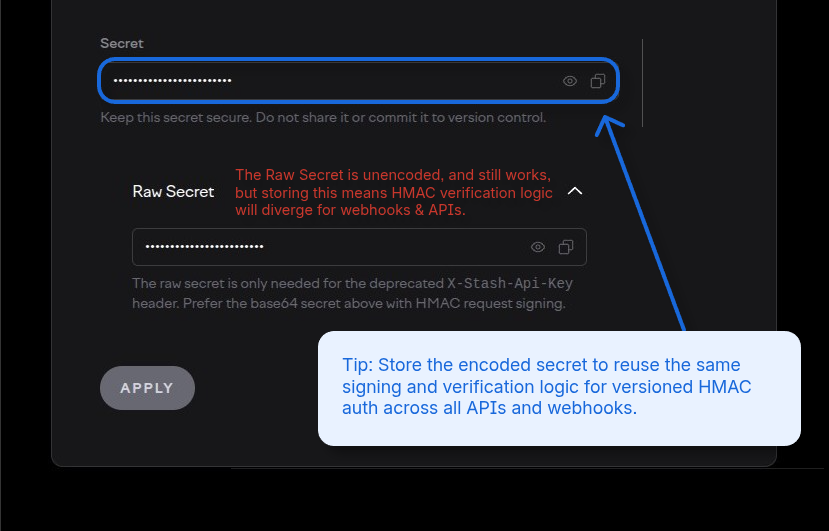
Why this matters: Versioned HMAC code base64-decodes the secret before computing the signature. If your stored value is already base64-encoded, the same decoding step works uniformly for ingress signing (API calls to Stash) and egress verification (APIs and webhooks from Stash):
const key = Buffer.from(secretB64, 'base64'); // same line works for allIf you skip this step and keep the raw secret, you must omit the base64-decode step in your HMAC code for these APIs. This means you can avoid storing the new encoded value in your database, but your API and webhook verification implementations will diverge.
From X-Stash-Api-Key header
Replace X-Stash-Api-Key: <secret> with a versioned HMAC signature. Your App ID is in Studio → Project Settings → General:
// Before
X-Stash-Api-Key: <your-api-key>

// After
x-stash-hmac-signature: v1;<appId>;<unixMillisTimestamp>;<base64-hmac>
See HMAC Signing for the full format and implementation code.
From legacy HMAC (stash-hmac-signature)
Update your webhook listener and real-time catalog request handler to verify x-stash-hmac-signature instead of stash-hmac-signature. The same egress key is used; the change is adding the timestamp and App ID to the signed message. Your App ID is in Studio → Project Settings → General:
// Before (legacy)
stash-hmac-signature: <base64-hmac-of-body>

// After (versioned)
x-stash-hmac-signature: v1;<appId>;<unixMillisTimestamp>;<base64-hmac-of-timestamp.body>
See HMAC Verification for the updated format and implementation code.
Migration rollout strategy
Test the new HMAC signing and verification in your test shop before releasing to production. All shop environments already send the versioned x-stash-hmac-signature header on egress APIs and webhooks and validate it on all SDK ingress APIs. You can start sending and checking the new header at any time without coordinating with Stash.
If you did the optional preparation step (you updated your stored secret to the base64-encoded value):
Keep both the old raw secret and the new base64-encoded value stored in every environment until the rollout is fully complete and 100% of server-to-server traffic is using the new versioned HMAC. Replacing the raw secret before the new code is live in production will break auth for active users mid-rollout.
Store the base64-encoded value as a new column or row in your database table. Do not overwrite the raw secret value until the new code is deployed and verified working in production.
Recommended sequence:
- Add the base64-encoded secret as a new column or row in your secret store (keep the raw value).
- Deploy the new HMAC signing and verification code in your test environment. Point it at the base64-encoded value.
- Verify auth works end-to-end in your test shop.
- Deploy to production. Verify auth works.
- Remove the raw secret from your secret store.
If you skipped the optional preparation step (you kept the raw secret):
You can roll out without managing two copies of each secret. Your API and webhook verification implementations will diverge slightly, but there is no DB migration required during the rollout.
Next Steps
- HMAC Signing: sign your backend calls to Stash (ingress)
- HMAC Verification: verify Stash's signed requests to your backend (egress)
- Stash Pay → Authentication: Stash Pay checkout link signing
- Stash Launcher Integration: apply ingress auth in launcher backend flows
- Real-time Catalog → Authentication: verify Stash's signed catalog requests
- Webhook Listener: implement HMAC Verification for incoming webhooks
How is this guide?
Roles & Permissions
Understand how app-scoped roles and account-wide ownership work in Stash Studio, including what each role can access.
Stash Webhooks
Learn about Stash webhooks - automated notifications sent to your backend when events occur across Stash products. Understand how to configure webhooks in Stash Studio and handle webhook events for player interactions, purchases, and more.