Unreal Engine Integration
Integrate Stash Pay in Unreal Engine projects using the Stash plugin wrapper.
The Unreal plugin is a wrapper around stash-native. We recommend reading the native SDK docs to understand the full capability set and platform-specific behavior.
Requirements
- Unreal Engine 5.0+
- iOS 12.0+ / Android API 21+
If you maintain an Unreal Engine 4 project, use the 4.27-plus branch: stash-unreal/tree/4.27-plus.
This is a experimental branch and we only actively mainatin Unreal Engine 5 support.
Install the plugin
Copy the plugin into your project
Copy Plugins/Stash/ from the stash-unreal repository into your Unreal project's Plugins/ directory.
Enable plugin in Unreal Editor
- Open your project
- Go to Edit -> Plugins
- Search for Stash
- Enable it and restart the editor
Verify nodes are available
In a Blueprint, confirm the Stash category exists and includes nodes such as:
Open Card/Open Card With ConfigOpen Modal/Open Modal With ConfigOpen Browser/Close Browser
Presentation modes
Unreal wrapper exposes the same three core modes as native SDK: OpenCard, OpenModal, and OpenBrowser.
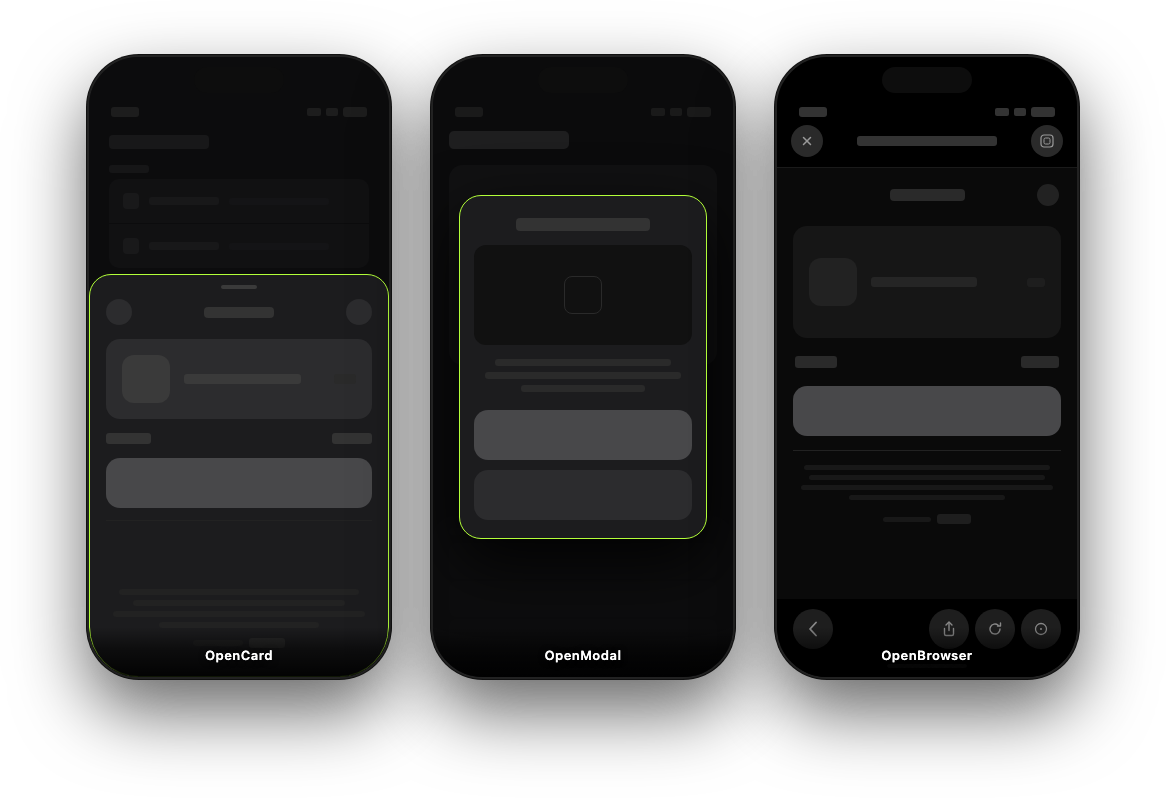
OpenCard
#include "StashBlueprint.h"

// Default config
UStashBlueprint::OpenCard(CheckoutURL);

// Custom config
FStashCardConfig Config = UStashBlueprint::MakeStashCardConfig(
    false,   // bForcePortrait
    0.68f,   // CardHeightRatioPortrait
    0.9f,    // CardWidthRatioLandscape
    0.6f,    // CardHeightRatioLandscape
    0.6f, 0.8f, 0.8f, 0.65f
);
UStashBlueprint::OpenCardWithConfig(CheckoutURL, Config);
OpenModal
UStashBlueprint::OpenModal(URL);

FStashModalConfig Config;
Config.bAllowDismiss = true;
UStashBlueprint::OpenModalWithConfig(URL, Config);
OpenBrowser
UStashBlueprint::OpenBrowser(URL);
// Optional on iOS:
UStashBlueprint::CloseBrowser();
CloseBrowser() is iOS-only in practice; on Android it is a no-op.
Callbacks and verification
Bind callbacks for payment success/failure, dialog dismissed, and related lifecycle events.
Use Get Stash Subsystem, then bind events on that subsystem object (Add On Payment Success, Add On Dialog Dismissed, etc.).
The static function library nodes are not where you bind delegates.
Always verify purchases on your backend before granting items. Client callbacks should only drive UX updates and refresh logic.
Open checkout from Unreal
Add dependency in your module Build.cs:
PublicDependencyModuleNames.Add("Stash");Then open checkout:
#include "StashBlueprint.h"

void AYourPlayerController::OpenCardCheckout(const FString& CheckoutURL)
{
    UStashBlueprint::OpenCard(CheckoutURL);
}
If you need a Blueprint-first flow, bind in C++ and forward to BlueprintImplementableEvent:
UFUNCTION(BlueprintImplementableEvent, Category = "Store")
void OnPaymentSucceeded();

void AYourPlayerController::OnPaymentSuccessReceived()
{
    OnPaymentSucceeded();
}
Landscape games and portrait checkout
For landscape-only games on iOS, use SetLandscapeLockWhenCardClosed(true) so gameplay stays landscape while the checkout overlay can rotate to portrait when needed.
UStashBlueprint::SetLandscapeLockWhenCardClosed(true);Recommended setup:
- Enable portrait orientation in iOS project settings so checkout is allowed to rotate.
- Call
SetLandscapeLockWhenCardClosed(true)once during startup. - Keep your gameplay camera/UI logic in landscape; let only the checkout overlay rotate.
Android backdrop for landscape-to-portrait transitions
When Android rotates from landscape gameplay into portrait checkout, you may see a brief black or stretched frame behind the overlay.
In Unity we handle this with setBackdropBytes(...) before opening checkout. Unreal wrapper does not expose that helper as a first-class Blueprint node today, so this is an advanced bridge customization.
If you need the same behavior in Unreal, extend the Android bridge (StashHelper / Java side) to pass a captured frame to the underlying native SDK before OpenCard, and clear it after dismiss to avoid stale backdrop reuse.
Only implement Android backdrop customization if you actually observe transition artifacts on your device matrix. Most teams can ship without it.
Android keep-alive service (optional)
Use keep-alive for browser-based flows where users temporarily leave the Unreal surface (Custom Tabs or external browser). On some Android devices, the OS can suspend or kill your game process during payment; keep-alive reduces that risk by running a short foreground service while checkout is external.
Enable Set Android Keep Alive Enabled(true) and optionally set Stash Keep Alive Config (Notification Title, Notification Text) to control notification copy.
Keep-alive is off by default. Enable it for flows that leave the app surface, then test on low-memory and OEM-customized Android devices where background process kills are more common.
Detailed references
- Unreal plugin docs and sample project: stash-unreal README
- Native SDK reference: stash-native README
- Stash Pay backend setup: /guides/stash-pay/integration
How is this guide?